
How to Clean Up Your Instagram Following
A practical, step-by-step routine for reviewing who you follow, protecting the accounts that matter, and removing the rest at a deliberate pace.

Most following lists grow by accident. You follow a friend's friend, a brand during a giveaway, a creator you liked for one week in 2022. Years later your feed is full of posts you never chose, and the people you care about are buried. This guide walks through a calm, repeatable cleanup you can do in one sitting and then maintain in a few minutes a month.
Decide what your feed is for
Before you remove anyone, write down in one sentence what you want Instagram to be for you. "Keep up with friends and family." "Follow people in my industry." "Find recipes and travel ideas." That sentence becomes your filter, and it stops you from second-guessing every row.
It also tells you which accounts to protect even if they will never follow you back: news outlets, favorite creators, businesses you buy from, and public figures. Not following back is normal for those accounts, and it is not a reason to lose them.
Get a complete, accurate list first
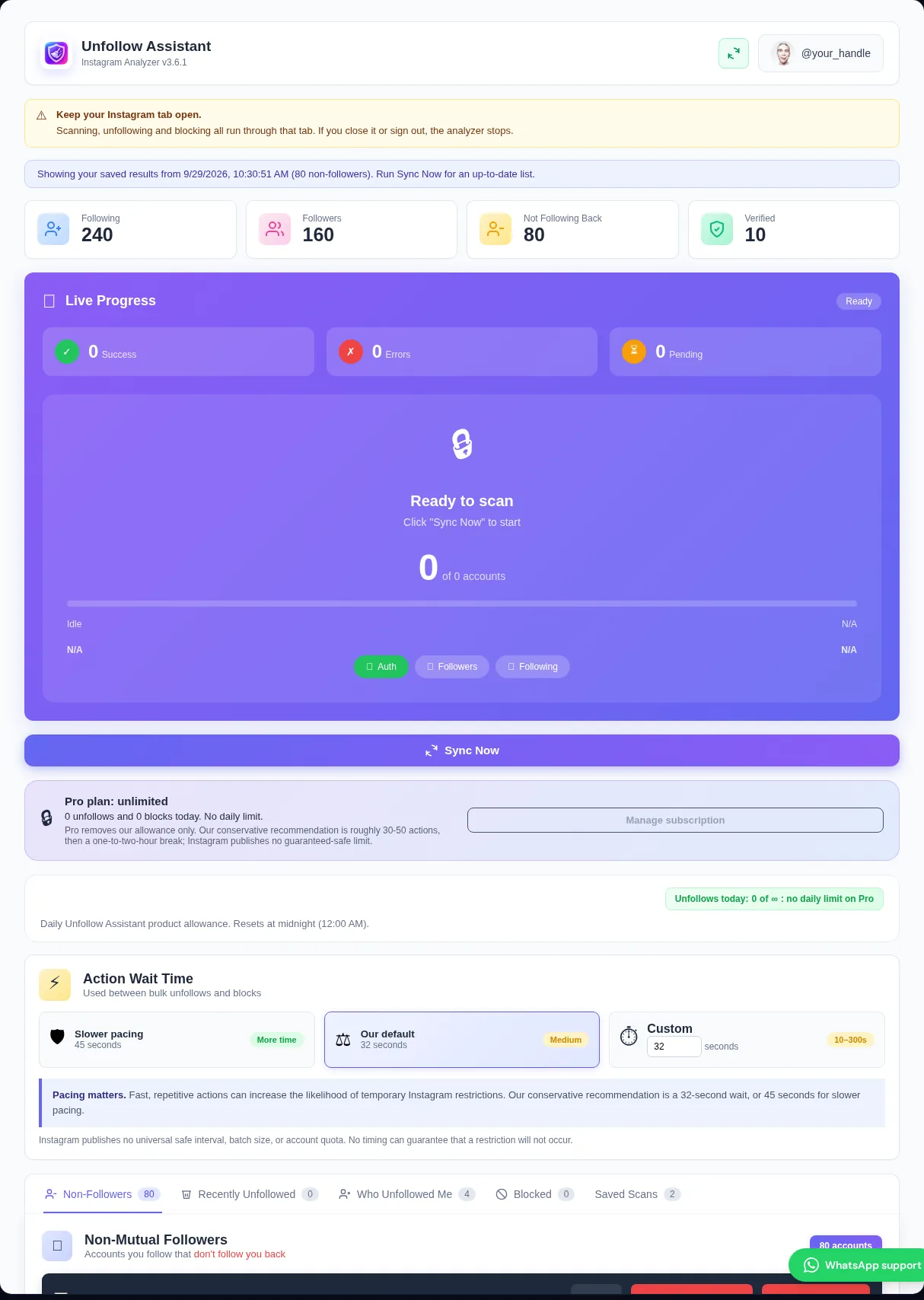
Scrolling through the Following screen on your phone is slow and easy to lose track of. A better start is a full comparison of your followers against the accounts you follow. Unfollow Assistant loads both lists from your own signed-in Instagram tab and only shows results once both lists finish, so you are never working from half a picture.
If a scan is interrupted, the extension keeps your last complete result instead of replacing it with partial data. That matters: a partial followers list would make real followers look like non-followers.
Protect the accounts you want to keep
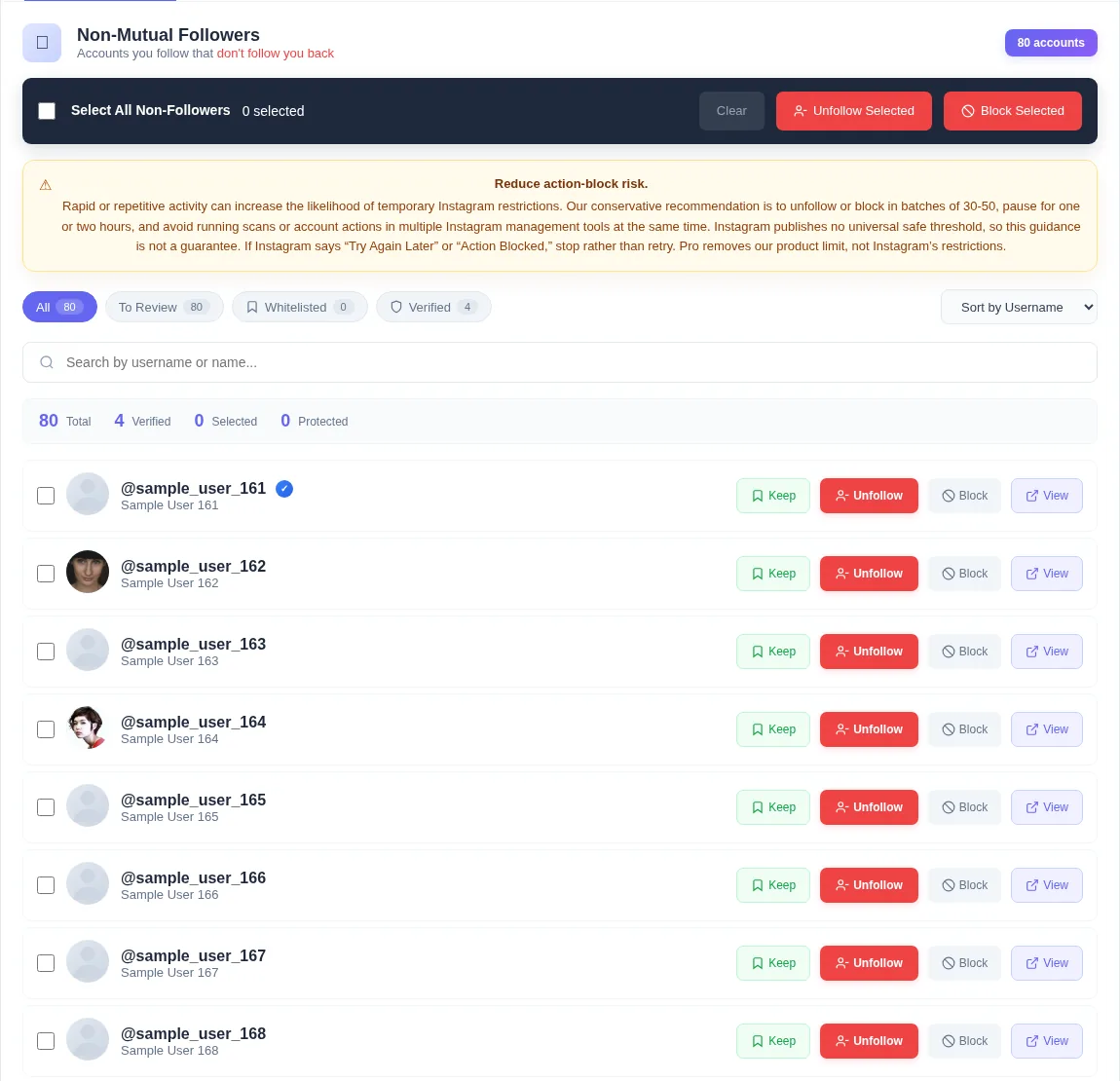
Go through the non-followers list once and press Keep beside anyone who matches your one-sentence goal. Kept accounts are skipped by Select All and by every queue, and they are checked again right before each action, so they cannot be unfollowed or blocked by mistake.
Keep works on your computer without an account. If you sign in, your Keep list is also backed up so it follows you to another browser.
Be generous with Keep on your first pass. You can always remove the Keep later, but a mistaken unfollow is harder to undo quietly.
Remove the rest in small batches
Once your exceptions are protected, select the remaining non-followers and start a queue. The extension waits between each action and shows who is next, how many are done, and how long until the next one. You can pause, resume, or stop at any time.
Instagram does not publish how many actions it allows, and the limit varies from account to account. Our conservative recommendation is roughly 30 to 50 actions followed by an hour or two away. This is not an official or guaranteed-safe threshold, but spreading activity out may reduce the likelihood of a temporary restriction compared with one rapid burst.
- Consider our conservative recommendation of roughly 30 to 50 actions per batch.
- Consider a one-to-two-hour break between batches; no schedule is guaranteed.
- Stop immediately if Instagram shows "Try again later".
- Do not run a scan and a large queue on the same account at the same time.
Keep it tidy with a monthly check
After the first cleanup, the list stays small. Run a new scan once a month, review the handful of new non-followers, and check the Who Unfollowed Me tab to see who stopped following you since your last complete scan. Five minutes a month is usually enough.
Frequently asked questions
Review your list the calm way
Unfollow Assistant is free, works in your own Instagram tab, and never asks for your password.
Keep reading

Understanding Instagram's Action Limits in 2026
Why there is no official unfollow limit, what action blocks look like, and our conservative pacing recommendations.
Read article: Understanding Instagram's Action Limits in 2026
Instagram Account Hygiene: A Monthly Checklist
A short, repeatable routine for keeping your profile clear, your following list intentional, and your account secure.
Read article: Instagram Account Hygiene: A Monthly Checklist
What Non-Followers Really Mean for Your Engagement
An honest look at non-followers, follower ratios, and engagement, and why cleaning your list is about control rather than a growth hack.
Read article: What Non-Followers Really Mean for Your Engagement